


Gemini Notebook can help turn a collection of documents into a useful working brief, but a well-written answer is only as dependable as the evidence behind it. Before using a summary for a client brief, check which sources were included, whether they are current, and whether the cited passages support the conclusions you plan to use.
Google’s current product page identifies Gemini Notebook as the product formerly called NotebookLM. This guide uses the current name and focuses on a practical source-review workflow. Product documentation was checked on November 17, 2026. The examples are fictional editorial exercises, not hands-on accuracy tests or measured performance claims.
What this guide helps you produce
The goal is a short brief that distinguishes verified facts, editorial suggestions, and unanswered questions. Imagine a freelance writer preparing a service-page outline for a fictional bicycle workshop. The reference pack contains an approved services document, an older price PDF, and notes from a planning meeting.
A useful brief should not blend those materials into one confident story. It should show which services are approved, identify the old price document, and keep proposed ideas separate from confirmed offerings. That distinction matters whether the final output is a web page, presentation, or internal report.
If your next output is interactive, our Gemini Notebook sites guide adds checks for filters, calculations, and sharing.
Google’s chat documentation describes source selection and citations that can be opened in context. It also describes experimental capabilities involving additional tools. Check the experience and tools you are using; do not assume every notebook interaction has the same information boundary.
1. Give the notebook one clear purpose
Begin with a specific deliverable. “Prepare a factual outline for the workshop’s repair-services page” gives you a practical way to decide which documents belong. “Learn everything about the business” encourages a collection that is harder to inspect and maintain.
Write a small acceptance checklist before importing files. For the workshop, it might require an approved service list, a clear audience, supported opening hours, and questions for missing prices. Add a rule that unsupported guarantees and customer testimonials must remain excluded.
Keep factual authority separate from writing preferences. An owner-approved policy can establish a service condition. A style note can establish tone. Neither should silently overrule the other outside its purpose. This simple distinction prevents a persuasive draft from becoming an accidental source of new business promises.
If you need help shaping the request, our prompt-writing guide explains how context, audience, and output structure make a task easier to evaluate.
2. Build a small source inventory
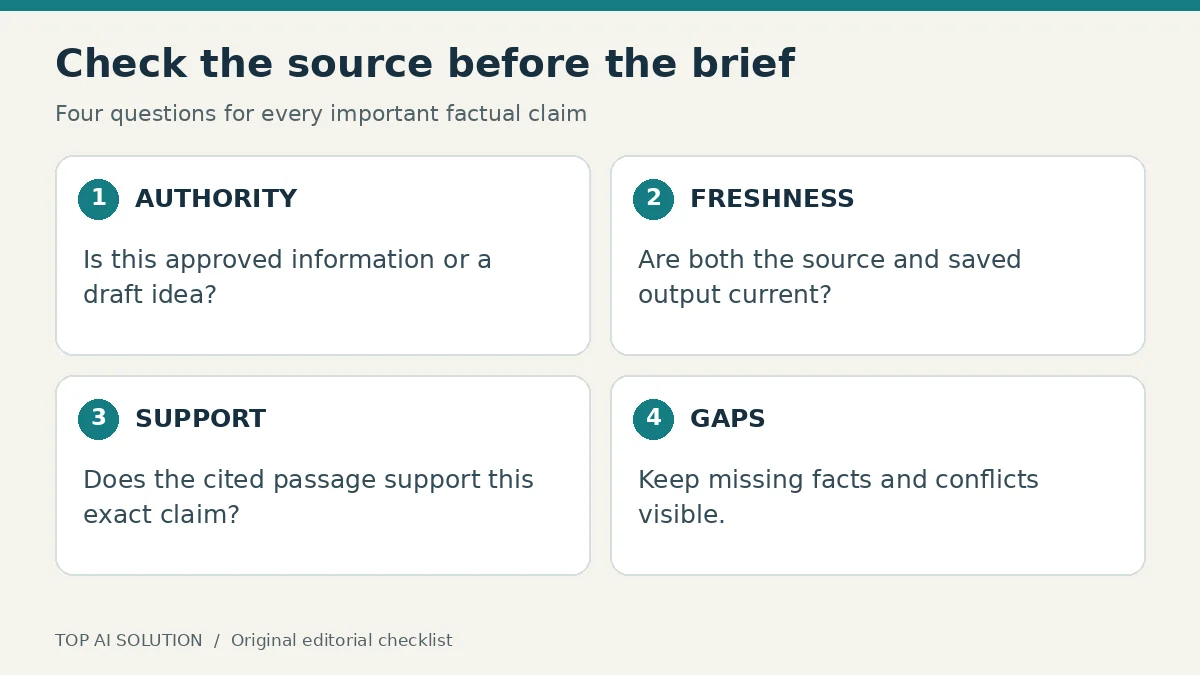
Before using Gemini Notebook for the brief, make a list of the documents you intend to include. Record each source’s title, owner, revision date, status, and role. Use plain labels such as approved facts, draft ideas, background reading, and superseded material.
For a first exercise, a few carefully chosen files are easier to review than a whole archive. Remove duplicates that add no information. If two versions must remain, explain why and identify which one governs the current task. A newer filename alone is not proof of approval.
The current source documentation supports several formats, including documents, PDFs, web URLs, and pasted text. It distinguishes imported copies from automatically synced sources. Choose the source format deliberately instead of assuming every item behaves like a live reference.
Do not upload material merely because you possess a copy. Confirm that you are allowed to use it for the task and that the chosen account is appropriate. Exclude unrelated confidential information so the notebook stays focused and the review burden remains manageable.
3. Check freshness source by source
Gemini Notebook sources can have different update behavior. Google’s current guidance says supported Drive imports synchronize automatically, while updating or deleting a source does not change previously generated Studio outputs. That makes source freshness and output freshness two separate checks.
In the fictional workshop example, the approved services document may have changed since the price PDF was exported. Compare the relevant passages directly. Do not ask the assistant to treat both as equally current simply because they appear together in the source list.
Create a short freshness note for the brief: which documents were checked, when you checked them, and which details still need confirmation. For volatile facts such as prices or opening hours, ask the responsible person to confirm the current value before publication.
Avoid assuming that refreshing a source repairs every saved summary, chart, or exported document. Revisit the outputs you intend to use. If a material fact changes, regenerate or revise the affected section and review it again. Keep the earlier approved version available until the replacement is checked.
4. Ask Gemini Notebook questions with known answers
Before requesting a full brief, test the reference pack with a few questions you can answer yourself. Ask which services are explicitly approved, which document supports the opening hours, and whether the materials contain a current price for a particular repair.
Include a question the sources cannot answer. For example, if nothing mentions battery repairs, ask whether that service is offered. The useful result identifies missing evidence. A confident invented service description should fail the check even if its wording sounds professional.
Use a deliberate conflict exercise with harmless sample files. One could state that bookings close Friday; another clearly marked older version could say Thursday. Ask the assistant to identify the disagreement and explain which document is approved. Remove the test material when the exercise is finished.
These checks assess the setup for your immediate task. They are not a scientific benchmark. Their value is exposing unclear source status, missing information, and poorly framed requests before those problems spread through a long draft.
5. Open citations and inspect the actual support
Gemini Notebook citations are useful review aids. Select a citation to examine its supporting context, as described in Google’s chat guide. Then compare the source wording with the claim in the answer. The important question is whether the evidence supports that exact statement.
A passage about a proposed weekend service does not establish that weekend appointments are currently available. A historical price does not establish today’s quote. A document about one branch does not automatically apply to every location. Look for conditions, dates, and exceptions that a summary may have compressed.
Use a claim ledger for the facts that matter most. Give each row a proposed statement, its source, the relevant passage, and a status such as verified or needs confirmation. Keep the ledger proportionate: you do not need a complex system for a three-paragraph brief.
When support is weak, narrow the wording or leave the claim out. Asking the assistant to rephrase the same unsupported sentence more confidently does not improve the evidence. If the source itself is unclear, send a precise question to the person who owns that information through your normal review process.
6. Separate facts from suggestions in the draft
Once the source checks pass, request a modest deliverable. Ask for an outline or one short section rather than a complete website. Specify that factual statements need support, creative suggestions need labels, and missing details belong in a separate questions section.
Try this original prompt with your own approved materials:
Prepare a short service-page brief using only the selected approved documents. Separate confirmed facts, suggested page structure, and unresolved questions. Identify the source supporting each factual item. If documents conflict, explain the conflict instead of choosing silently. Do not invent prices, guarantees, opening hours, qualifications, or customer feedback. Leave missing facts visibly unresolved.
Review the output in two passes. First check factual support. Then assess whether the structure suits the intended reader. This prevents attractive writing from distracting you from an unsupported business claim.
For an alternative way to organize instructions and reference material, our Claude Projects guide describes a client-content workflow. The tools differ, but the practical need for approved facts and accountable review remains.
7. Save a dated handoff and maintain it
Before sending the brief onward, add the review date, source list, approval owner, and unresolved questions. Make it obvious whether the document is a draft or approved for use. The person writing or publishing the final page should not need to reconstruct that status from a chat history.
Keep the source inventory with the brief. If a service changes next month, you can identify the affected material instead of rereading every conversation. A short maintenance note is especially useful when another freelancer or employee takes over the work.
Review the actual exported or copied output. Check that headings, links, and qualifications survived the handoff. A careful notebook review is less useful if the final document loses the caveat that a price still needs confirmation.
Set a review trigger appropriate to the content. A price change, a new service, or a revised policy should prompt another source check. Stable background material may need less frequent attention. Do not treat every saved brief as permanently current simply because its original sources were trustworthy.
Common problems and practical fixes
If the answer mixes old and new information, inspect the source list and approval labels first. If citations point to broadly relevant but insufficient passages, ask narrower questions and check the exact wording. If a response omits an important condition, include that condition in the acceptance checklist.
If an expected source is unavailable, verify your access and the original file’s status. Google’s guidance says losing Drive access can make the imported source inaccessible. Do not work around an access restriction by copying confidential material into another account without authorization.
If the brief keeps growing, return to its purpose. Remove background that does not help the intended reader make a decision. Source review should make the output clearer and more useful, not turn a simple task into an unmanageable archive.
Conclusion
Gemini Notebook works best in a process where sources have clear roles and important claims receive human review. Start with one deliverable, check freshness, inspect citations, and save a dated handoff. The goal is a brief whose facts and uncertainties are easy to understand before anyone relies on it.
Frequently asked questions
Is Gemini Notebook the same product previously called NotebookLM?
Google’s current product page identifies Gemini Notebook as formerly NotebookLM. Older tutorials may therefore use the previous name or describe an earlier interface.
Does a citation prove that a statement is correct?
No. Check the cited passage and its context. It may support only part of the statement, apply to an older date, or describe a proposal rather than an approved fact.
Should I upload every document I have?
Start with a small set of relevant, approved materials. Exclude duplicates, unrelated confidential content, and superseded documents unless they serve a clear purpose in the task.
What should I do when two sources disagree?
Record the conflict, check their dates and approval status, and ask the responsible owner which information controls. Do not let a fluent summary hide the disagreement.
Is this workflow an accuracy guarantee?
No. It is a practical review process for finding common source and drafting problems. Important outputs still need the appropriate human review before publication or operational use.